
Access Control Integration a Practical Planning Guide
You usually know it's time for an upgrade before you know what to call it. A manager quits and never returns the keys. A cleaning crew needs after-hours access, but only on certain days. One office door has a keypad, the back entrance still uses brass keys, and nobody can say with confidence who can get into the building right now.
That's where access control integration stops being a technical buzzword and starts looking like basic operational control. It means your doors, credentials, schedules, cameras, alarms, and employee records stop living as separate systems. They start working together in a way your staff can use every day.
That shift is already well underway. The global access control market was valued at $9.8 billion in 2023 and is projected to reach $15.2 billion by 2029, reflecting the move from mechanical locks to smart, networked systems with real-time auditing and remote management, especially in commercial settings, according to Entrycare's access control market summary.
Table of Contents
- Moving Beyond the Master Key
- The Blueprint Phase Assessment and Planning
- Choosing Your Technology Stack
- Connecting Systems for Smarter Security
- From Plan to Reality Installation and Testing
- Launch and Long-Term System Management
Moving Beyond the Master Key
Most businesses don't replace keys because they love new technology. They replace keys because the old system stops matching the way the business runs.
A single storefront with two employees can survive on copies of a master key and a lot of trust. A growing office, clinic, warehouse, or apartment building can't. Once you have staggered shifts, vendors, temporary staff, delivery access, or internal rooms that not everyone should enter, physical keys become hard to control. One lost key can turn into a rekeying project across multiple doors, and one former employee with an unreturned copy can leave you guessing instead of knowing.
That's the fundamental distinction. Keys leave you with assumptions. Access control gives you decisions, logs, schedules, and revocation.
Practical rule: If you've ever had to ask “Who still has a key to that door?” you're already dealing with an access control problem.
A lot of owners try to solve this halfway. They add one keypad to the back door, keep keyed cylinders everywhere else, and treat cameras as a separate issue. That patchwork usually creates more confusion than control. Staff end up learning different rules for different doors, and managers still rely on manual workarounds.
A better move is to think in terms of a system. Front entrance, employee entrance, office suite, stockroom, server closet, after-hours cleaning access, and camera verification all need to fit together. Sometimes that starts with electronic hardware on only a few critical openings. Sometimes it starts with replacing the lock strategy entirely. If you're weighing the physical side of that decision, this comparison of rekeying locks versus replacing them is a useful place to start.
Where the upgrade pays off
The value isn't only tighter security. It's also less friction.
- Employee changes get cleaner: You can issue or remove access without collecting metal keys first.
- Managers stop being gatekeepers: They don't have to meet every contractor at the door.
- Investigations get faster: You can check an event history instead of reconstructing a timeline from memory.
- Lock-up routines get more consistent: Schedules and permissions replace whoever remembered to close up.
For a first major security upgrade, that's usually the right frame. This isn't just about buying readers and electric strikes. It's about making the building match the way your business operates.
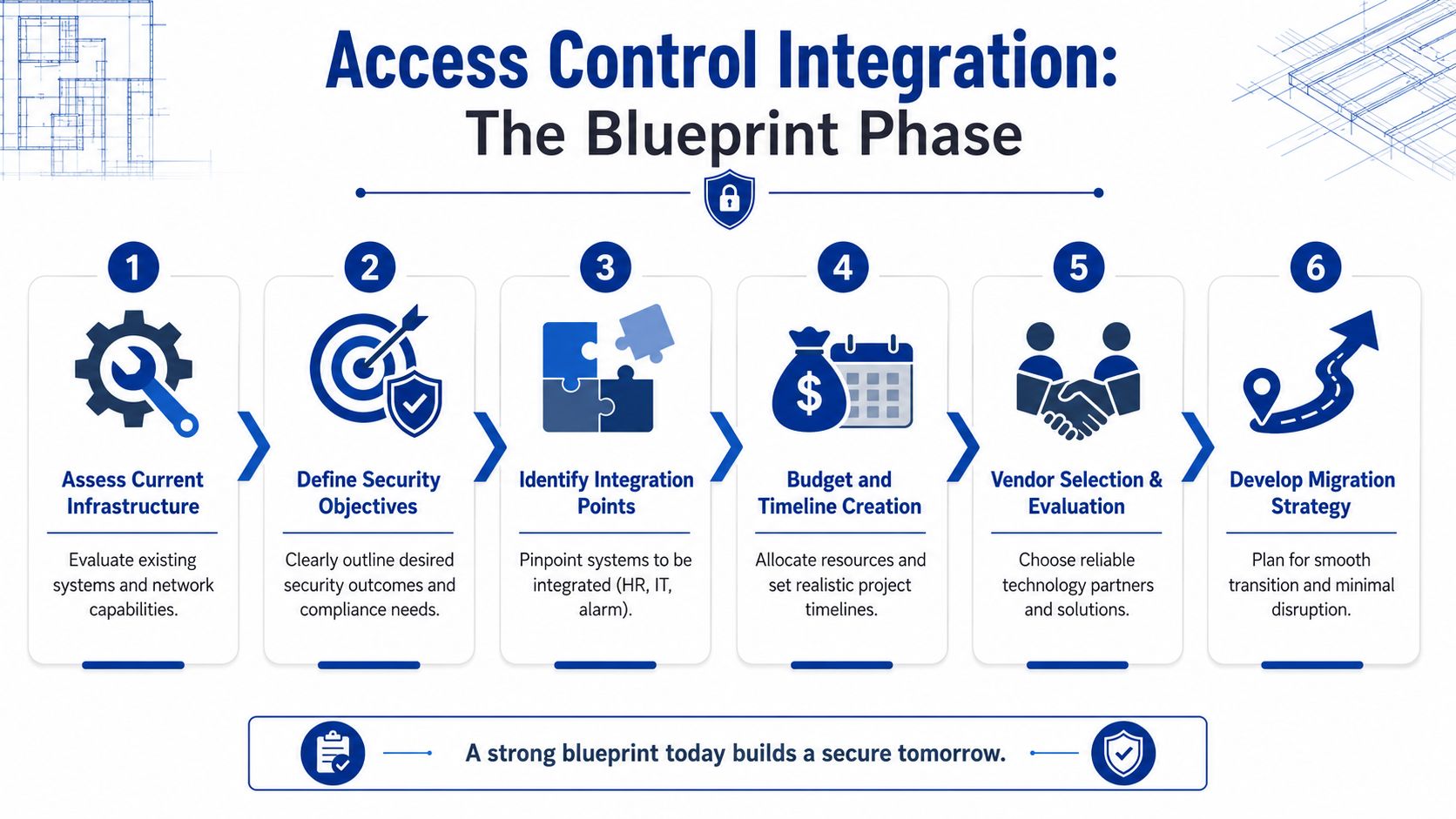
The Blueprint Phase Assessment and Planning
The biggest mistakes in access control integration happen before installation day. They start when someone buys hardware first and asks operational questions later.
A sound project begins with a walkthrough and a written scope. Not a rough idea. A real list of doors, users, schedules, existing hardware, wiring conditions, and system goals. If that part is sloppy, everything downstream gets expensive.
Start with the building, not the brochure
Vendors often start with software features. Field planning should start with doors.
Walk the property and note each opening that matters. Include main entries, rear doors, interior restricted areas, delivery access, gates, and any shared building entrances. Then check what's physically there now: door material, frame condition, fire-rated openings, closers, panic hardware, latch alignment, available power, and cable paths.
That matters because not every door accepts the same upgrade cleanly. A glass aluminum storefront behaves differently than a hollow metal service door. A maglock might look simple on paper and be a poor fit in daily use. A reader may be easy to mount, but the door position switch or request-to-exit device might be the part that gets neglected.
Use a planning checklist like this:
- List every controlled opening: Include exterior and interior doors, even if you think some may stay mechanical for now.
- Identify life-safety constraints: Fire-rated doors, egress requirements, and emergency release rules affect hardware choice.
- Check the path for wiring and power: A clean cable route saves headaches later. A bad route creates callbacks.
- Document current bottlenecks: Lost keys, propped doors, shared codes, and after-hours access confusion all belong in the scope.
A good access plan doesn't start with “Which reader do you want?” It starts with “What happens at this door all day?”
Map people to doors and times
Once the openings are mapped, define who needs access and when. Keep it role-based. Don't start by naming individuals. Start with groups such as front-office staff, warehouse staff, managers, cleaning crews, IT, maintenance, and vendors.
That step is where many first-time projects either become manageable or drift into chaos. If every person gets custom permissions, the system becomes hard to maintain. If every group gets broad permissions, the system becomes easy to abuse.
A practical access matrix should answer four questions:
- Who are the user groups
- Which doors does each group need
- At what times do they need them
- Who approves exceptions
Write the project goals in plain language
The scope should also state what success looks like. Keep it concrete.
- Replace physical key dependence: Reduce or eliminate shared key circulation.
- Improve audit visibility: Make door activity reviewable by managers or security leads.
- Support staff changes faster: New hires, transfers, and departures shouldn't require manual lock work each time.
- Reduce daily workarounds: Fewer hidden keys, fewer shared keypad codes, fewer “just leave it unsecured” habits.
A written scope keeps everyone honest. It stops the project from drifting into feature shopping and keeps the focus on how the building is used in real life.
Choosing Your Technology Stack
Once the plan is solid, technology choices get easier. They're still important, but they stop feeling abstract. You're no longer asking what's modern. You're asking what fits the doors, the staff, and the risk.
Most businesses make two decisions here. First, what kind of credential people will use. Second, where the system will be managed, either on-site or through a cloud platform.
Pick credentials based on daily use
Every credential type has trade-offs. The best one is usually the option your staff can use consistently without creating new failure points.
| Credential Type | Pros | Cons | Best For |
|---|---|---|---|
| Key cards | Familiar, simple to issue, easy to replace | Can be shared, lost, or damaged | Offices, schools, multi-user commercial spaces |
| Fobs | Durable, convenient on keyrings, quick for frequent entry | Still transferable, still easy to misplace | Small businesses, staff entrances, tenant access |
| Mobile credentials | No extra badge to carry, remote issuing and revocation, convenient for distributed teams | Depends on phone habits, battery life, and user comfort | Modern offices, multi-site organizations, managers and mobile staff |
| Biometrics | Strong identity assurance, hard to share casually | Higher complexity, privacy concerns, not ideal for every door | High-security rooms, selective interior zones |
| PIN codes | Low hardware complexity, no card to issue | Codes get shared, forgotten, or reused too broadly | Low-risk utility areas, temporary access situations |
There isn't a universal winner. Mobile credentials sound appealing until you realize some staff don't want to use personal phones for work access. Key cards are easy to understand, but they travel well between people. Biometrics can tighten control in the right spot, but they're not automatically the right answer for the whole building.
For many small and midsize businesses, a hybrid model works best. Use a familiar credential for general access and reserve stricter methods for sensitive rooms. If you're exploring modern options at the door level, this guide to keyless commercial entry options in Shakopee gives a practical view of how these systems show up in day-to-day business use.
Choose hosting based on operational tolerance
The cloud versus on-premise decision usually gets framed as convenience versus control. In practice, it's more about who will support the system and what happens when something goes wrong.
Cloud-based access control has become the default direction. Eighty percent of new access control deployments are cloud-based for centralized management, but the important caution is the resilience gap during network or power outages, as noted by Evalink's discussion of integrated access control systems. If you go cloud-first, you need a failover plan. That isn't optional.
Here's the practical comparison:
On-premise systems
These make sense when you want local control and you have internal support for servers, updates, backups, and permissions management. They can be a fit for facilities with strict internal IT policies or limited comfort with external dependency.
The downside is that many smaller businesses underestimate the maintenance burden. The server still needs care even when the doors are quiet.
Cloud-managed systems
These make administration easier for multi-site teams and managers who need remote visibility. They also reduce some local infrastructure headaches.
But convenience creates a trap. Some buyers assume cloud means the door will always behave intelligently no matter what. It won't unless the architecture includes local decision-making, backup power, and a clear outage mode.
Don't ask only, “Can I unlock doors from my phone?” Ask, “How will this site behave if internet service drops during the busiest shift change?”
Think beyond hardware price
Cheap readers installed on the wrong doors are expensive. So is advanced software paired with weak enrollment practices.
When comparing systems, include:
- Door prep and hardware fit: The opening often costs more effort than the reader.
- Licensing and expansion: Adding doors later shouldn't require a rip-and-replace decision.
- Credential administration: Issuing, replacing, and revoking access has labor costs.
- Support burden: Someone has to own the system after the installer leaves.
That's the fundamental technology stack decision. Not just what can be installed, but what can be operated reliably.
Connecting Systems for Smarter Security
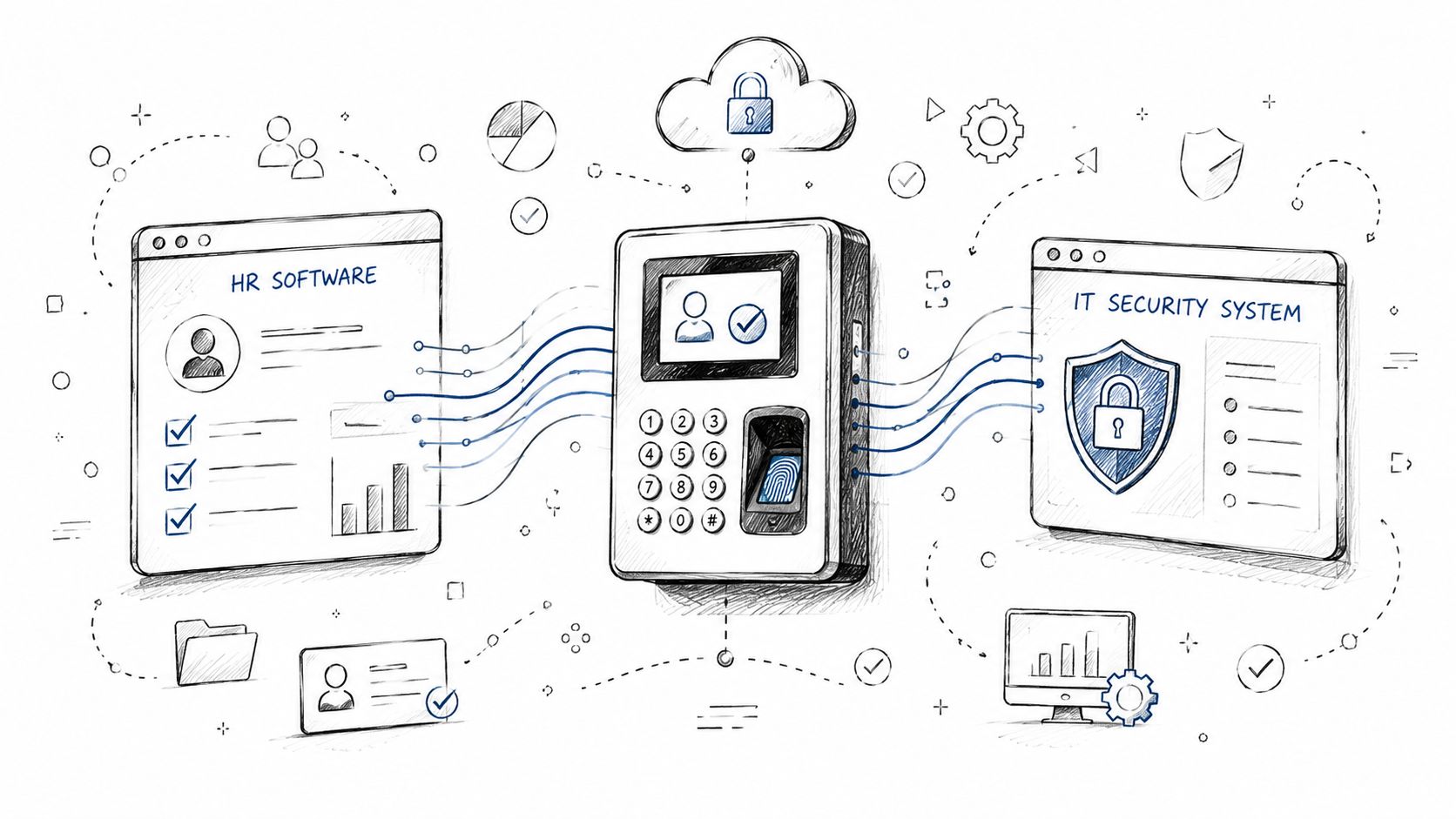
A standalone access system can lock and open doors. An integrated one can answer what happened, who triggered it, whether the event matched policy, and what should happen next.
That difference matters most when you connect access control to the systems your business already depends on.
Link access events to video the right way
Video is where many owners first see the value of integration. A denied badge at a side entrance means more when you can pull the matching clip quickly. A forced-open alarm becomes easier to assess when the camera and the door event line up in the same timeline.
But this only works if the integration is configured cleanly. Access control and CCTV need more than a loose connection. They need synchronized event mapping, reliable triggers, and accurate timestamps. Otherwise, the footage is present but not useful.
That's also why access control and camera projects should never be treated as separate islands if the end goal is investigation quality. Security teams don't need more video. They need the right video attached to the right door event.
If your camera time and door event time don't match, your system may still record everything and still fail you when you need evidence.
Treat HR as a source, not the final authority
HR and identity systems are another powerful integration point, but they create one of the most overlooked risks in physical security.
The useful part is obvious. When someone is hired, transferred, promoted, suspended, or terminated, access rights can change quickly without waiting for a manager to remember a manual step. That keeps operations moving.
The dangerous part is subtler. A payroll or HR system may be the master record for employment status, but it isn't automatically the best authority for physical access decisions. The core pitfall is the conflict between payroll data needs and security priorities. A framework is needed to validate that automated role-based access profiles match physical security constraints before syncing, as explained in Matrix Comsec's analysis of access control integration.
That matters in real buildings. An overtime approval doesn't necessarily mean broad after-hours access. A title change doesn't automatically justify entry to storage, cash handling, or IT spaces. If those assumptions are pushed straight from HR into door permissions, privilege creep becomes easy.
A workable model looks like this:
- HR confirms status: Active, inactive, transferred, contractor, leave, termination.
- Security defines role templates: Which doors, schedules, and zones are appropriate.
- Managers approve exceptions: Temporary or unusual needs get reviewed, not auto-granted.
- System logs changes: Permission edits should be visible and attributable.
After you've seen the workflow once, the logic becomes simple. HR can start the change. Security should govern the access pattern.
A short overview helps explain how these integrations often get implemented in practice:
Add alarms where the workflow supports them
Alarm integration can also be effective, but only when it matches the building routine. In some sites, a valid first-entry credential can disarm a partition automatically. In others, that creates too much risk because cleaning crews, vendors, or early arrivals don't need the same authority as managers.
The right question isn't whether systems can integrate. It's whether the rule reflects how the site operates.
From Plan to Reality Installation and Testing
Installation is where paper decisions meet the realities of doors, frames, power, and traffic flow. This is also where rushed work starts showing up later as nuisance alarms, latch problems, reader failures, and staff frustration.
A good install doesn't just make the system turn on. It makes the opening behave correctly every day.
Installation succeeds at the door level
Electronic access hardware has to respect the door it's mounted on. A strike that isn't aligned cleanly will create intermittent issues. A door closer that slams or doesn't latch consistently will produce false assumptions about the controller. A reader mounted in the wrong place can create awkward user behavior, especially during busy entry periods.
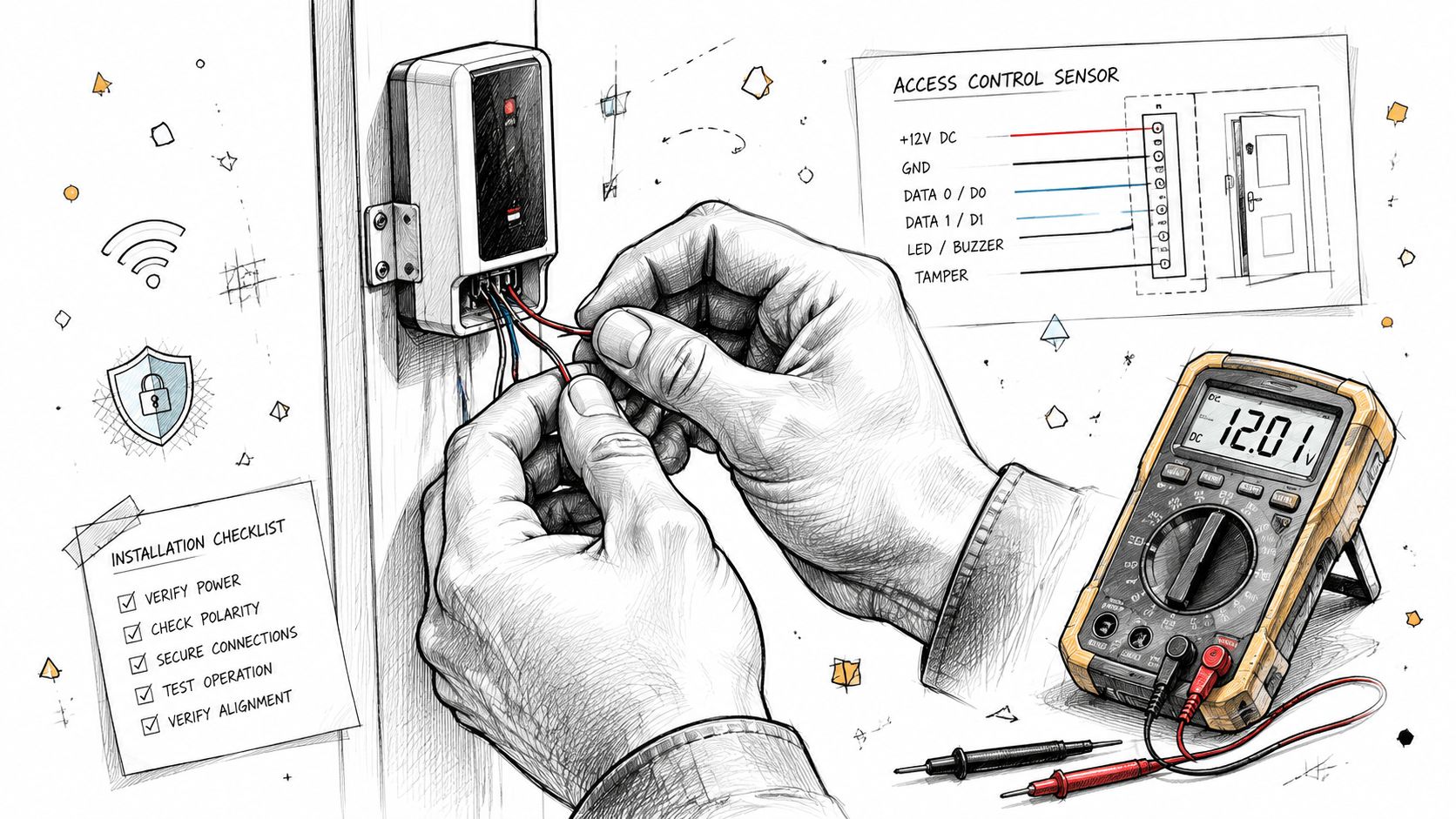
The physical side usually includes several tasks at once:
- Door hardware installation: Electric strikes, maglocks, electrified lever sets, or other locking hardware suited to the opening.
- Low-voltage work: Cable runs for readers, request-to-exit devices, door contacts, and panels.
- Panel and power setup: Enclosures, power supplies, battery backup, and labeling that future technicians can follow.
- Reader mounting and enrollment prep: Hardware needs to be placed where users can present credentials naturally and safely.
Clean workmanship matters more than many buyers expect. A tidy enclosure, labeled conductors, and documented door naming save hours later. So does leaving room for service instead of packing everything tightly just to close a cabinet door.
Testing has to mimic real life
Once the hardware is in, the main job is proving the system behaves as intended under normal use and edge cases.
For CCTV integrations, a three-phase methodology is critical: hardware installation, communication setup, and configuration. The most common failure point is incorrect time-stamping, which can make video evidence useless if access events and video logs don't align, according to Action1st's guidance on integrating access control with CCTV.
That warning should shape the testing process. Don't just check whether the door operates. Check whether the event is named correctly, whether the camera bookmark appears, whether the timestamps align, and whether the recording is retrievable later.
A solid test plan includes:
- Valid entry tests: Confirm authorized users can enter at the correct times.
- Denied access tests: Confirm the system blocks access outside assigned roles or schedules.
- Door state tests: Forced-open, held-open, and propped-door conditions should create the expected events.
- Integration checks: Verify camera, alarm, and software notifications respond correctly.
- Outage behavior: Confirm how the site behaves during network interruption or power loss.
Commissioning isn't complete when the installer says the system is online. It's complete when a manager can trust what the event log actually means.
Testing should happen before live rollout, not during the first workday rush. That's how you avoid day-one failures that damage user confidence before the system has a chance to help.
Launch and Long-Term System Management
The system can be installed perfectly and still underperform if staff don't understand the rules or nobody owns the upkeep.
Most long-term problems in access control integration aren't caused by bad readers. They're caused by bad habits. Shared credentials, undocumented exceptions, skipped audits, and old users left active subtly weaken the system over time.
Train users on rules, not just buttons
Training should be short, direct, and tied to daily behavior. Employees need to know how to present credentials, what to do when access is denied, how to report a lost card or phone, and when they must not hold a door for someone else.
Managers need a different layer of training. They should know who approves access changes, how temporary access works, what events deserve review, and how to escalate a hardware issue versus a permission issue.
Keep the policy in writing. It doesn't need to be long. It does need to answer operational questions clearly.
- Credential handling: Staff shouldn't share cards, fobs, phones, or PINs.
- Visitor access: Temporary entry should be assigned intentionally, not improvised.
- Exception approval: Overtime, vendors, and after-hours access need a defined approval path.
- Incident response: Teams should know what happens after a denied event, lost credential, or suspicious entry attempt.
Maintenance is where security stays real
Software updates, battery checks, hardware inspections, and periodic access reviews aren't side tasks. They're the work that keeps the original investment trustworthy.
One of the biggest ongoing risks is the old credential that never gets turned off. A critical success factor is automating employee lifecycle changes because manual processes often lead to zombie accounts, where expired credentials for former workers remain active and create unauthorized access risk, as outlined in Interweave Technologies' access control best practices.
That's why mature system management usually includes both automation and review.
A practical operating rhythm
Instead of treating the platform as “installed and done,” run it like an ongoing business function:
- Onboarding: Give access based on approved role templates, not one-off convenience.
- Role changes: Review whether the person still needs prior doors before adding new ones.
- Offboarding: Remove credentials immediately and confirm remote or backup methods are also disabled.
- Recurring audits: Review active users, door groups, schedules, and exceptions on a regular cadence.
- Hardware checks: Verify contacts, readers, strikes, and backup power before they fail in the middle of operations.
This is where a maintenance partner matters. Not because the system is fragile, but because every live environment drifts without upkeep. Doors sag. Batteries age. departments change. Temporary access becomes permanent if nobody revisits it. If you're planning for that long view, ongoing locksmith and security maintenance support should be part of the conversation from the start.
A well-run access system doesn't just secure doors. It reflects how the business hires, changes roles, manages vendors, handles incidents, and closes gaps before they become habits.
If you're planning your first serious access control upgrade and want local help that understands both the software side and the physical reality of doors, frames, and hardware, Mena's Key can help you evaluate the site, choose workable options, and keep the system maintainable after installation.